
If you think your laptop is too slow or freezes frequently when performing tasks, you may not need a new computer. There are instances when a RAM upgrade is all you need to improve the performance of your laptop. At Lapcare Computers, we offer RAM upgrade services for our customers who wish to improve the efficiency of their laptops.
In this guide, we’ll explain how RAM works, why upgrading it helps, and when it’s the right solution for you.
What Is RAM and Why Is It Important?
RAM is the (random access memory) of a computer. It is the temporary storage of data in a computer. The more the RAM in a computer, the more tasks the computer is able to accomplish simultaneously.
For example:
- Browsing multiple Chrome tabs
- Running design software
- Editing videos
- Using accounting or office applications simultaneously
When the RAM in a computer is low, the hard drive is used as a backup for the computer’s memory. The hard drive is too slow for a computer’s memory.
Signs Your Laptop Needs a RAM Upgrade
You may need a RAM upgrade for your laptop when you experience the following:
- Slow performance while multitasking
- Frequent application crashes
- System freezing during heavy usage
- Long boot times
- High memory usage in Task Manager
If your laptop constantly struggles with everyday tasks, increasing RAM can provide an immediate performance boost.
How a RAM Upgrade Improves Laptop Performance
1. Faster Multitasking
More RAM means that you can multitask faster. You can run multiple applications simultaneously, such as opening multiple tabs in the browser, sending emails, working with spreadsheets, and making video calls.
2. Better Performance for Heavy Software
Some software, such as graphic design, video editing, and gaming, require more RAM to function properly. By increasing the RAM, you can enjoy faster performance and minimal lag.
3. Reduced System Crashes
Lack of RAM can cause system crashes, but increasing the RAM can help you avoid such situations.
4. Improved Overall Speed
More RAM means that you can enjoy faster performance from your laptop, making it easier to work more efficiently.
RAM Upgrade vs Buying a New Laptop
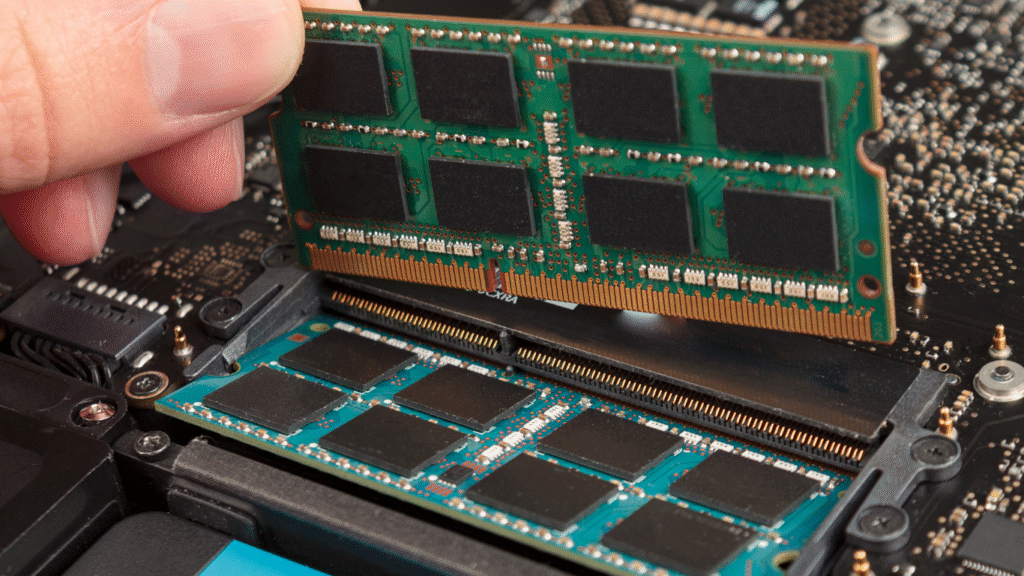
Some people assume that the laptop is slow and hence the need to buy a new laptop, but the truth is that you can always upgrade the RAM to improve the laptop’s performance.
A professional assessment can determine:
- Current RAM capacity
- Maximum supported RAM
- Compatibility with your motherboard
- Whether additional upgrades (like SSD) are recommended
At Lapcare Computers, we always conduct an assessment to find out what you need to improve the performance of your laptop to ensure that the upgrades we make for you are safe and efficient.
How Much RAM Do You Need?
Here’s a general guideline:
- 4GB RAM – Basic browsing and light usage
- 8GB RAM – Office work, multitasking, students
- 16GB RAM – Designers, video editors, gamers
- 32GB+ RAM – High-end professional workloads
Choosing the right RAM depends on your usage requirements.
Why Professional RAM Installation Matters
Although RAM upgrades may look simple, improper installation can cause system damage or compatibility issues. Professional technicians:
- Check RAM compatibility
- Ensure correct installation
- Test system stability
- Provide performance optimization
This ensures your laptop runs safely and efficiently after the upgrade.
Why Choose Lapcare Computers?
At Lapcare Computers, we provide expert laptop repair and upgrade services in Bur Dubai. Our technicians have extensive experience with hundreds of RAM upgrades for various laptop models.
We focus on:
- Genuine and compatible components
- Transparent pricing
- Quick turnaround time
- Customer-first service approach
Our commitment is to not only repair your laptop but to do so effectively and efficiently.
Final Thoughts
A RAM upgrade is one of the best ways to boost laptop performance without having to spend too much. If your laptop is slow but still working perfectly, it may be best to upgrade your RAM to avoid purchasing a new laptop.
If you are still unsure if your laptop is worthy of a RAM upgrade, it is best to get it checked by professionals.

